Last updated: July 2026
Place the Keycaps! Items & Keycaps
Complete item reference for Place the Keycaps! on Roblox: keycap types, keyboard parts, collection entries, and beta loot as the sorting puzzle expands.
Understanding Items in a Sorting Puzzle
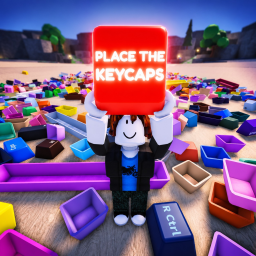
Items in Place the Keycaps! are the physical keycaps you pull from piles and the keyboard assemblies you complete. Unlike tycoon games where items generate passive income, every item here serves the sorting loop: identify, transport, place, confirm. KEYBOARDS!!!!! builds collection fantasy around real keyboard layouts — alphas, modifiers, function rows, and specialty keys.
Each keycap has visual traits: profile height, legend printing, colorway, and row shape. Matching traits to the target keyboard is the puzzle. Wrong-profile caps may not seat correctly in beta builds, giving immediate feedback. Learn row conventions early via our sorting guide.
Collection UI likely tracks completed sets as items unlocked in a catalog. Even if exact names shift during beta, expect categories like standard ANSI sets, themed artisan caps, and incomplete hybrids until you finish sorting.
Keycap Categories
Alphas include A–Z and number keys forming the main typing grid. They are the highest-volume drops in piles and the first category new players sort. Color mismatches within the same set still count as wrong until the full design matches the target board.
Modifiers cover Shift, Ctrl, Alt, Tab, Caps Lock, and Enter variants. These caps are wider than alphas and easy to mis-throw. Place modifiers before filling surrounding alphas when possible so large slots stay visible.
Function and specialty keys include F1–F12, arrow clusters, numpad keys, and spacebars. Spacebars are often the largest single piece in a pile and block pickup lines-of-sight until moved. Endgame collection goals usually require full specialty rows, not just alphas.
Rarity and Themed Sets
Beta may introduce rarity tiers — common desk keys, uncommon colorways, rare artisan sculpts. Rarity affects pile spawn weight, not combat stats, because this is a puzzle rather than an RPG. Our tier list ranks sets by desirability and sort difficulty.
Themed sets mimic real-world keyboard aesthetics: retro beige, neon gaming, minimalist gray-on-gray. Completing a theme often grants a display shelf or room decoration if housing features exist. Watch the map page for showcase areas.
Limited event items may appear during beta weekends listed on the events page. Event caps sometimes use unique legends readable only under certain lighting — screenshot your collection for wiki contributions when you find undocumented variants.
Inventory and Collection Tracking
Your inventory holds caps you carry from the pile before placement. Overloading inventory may slow movement or block new pickups — exact limits depend on beta tuning. Drop extras near staging zones rather than carrying entire piles at once.
The collection catalog records finished keyboards. Partial progress might show silhouettes for missing keys, encouraging targeted sorting instead of random grabs. Use that UI as a checklist; our collection completion guide expands the strategy.
Trading or gifting items is uncommon in early beta unless Roblox marketplace features arrive. Assume personal progression unless official notes say otherwise.
Beta Data Gaps and Wiki Updates
Because Place the Keycaps! is in active beta, item IDs and names may change between patches. This page describes systems and categories rather than a static loot table that could be wrong tomorrow. Community screenshots help us refine entries after updates.
No promo items from codes exist yet — see codes page for future cosmetic additions. Gameplay-earned items remain the primary collection path.
Report newly discovered caps with clear images when posting feedback to KEYBOARDS!!!!!. Accurate item documentation helps every sorter finish keyboards faster.
Identifying Unknown Caps
When beta introduces unscanned caps, compare profile shape to slots before color. Row shape mismatches mean wrong board type even if the colorway looks perfect.
Stack duplicates face-down in staging if the game allows rotation — some builds hide legends until pickup. Pickup-then-read beats squinting at pile angles.
Cross-reference new finds with tier discussions once community names stabilize. Early screenshots you take today become tomorrow's definitive items list entries.